At any given point in time, hundreds of millions of people around the world are using the internet. They log on, they work, they shop, they communicate with each other, and all of this is accomplished through countless webpages. Each and every one of these websites have their own unique look and feel, helping to contribute to their own specialized user experience. The work that goes into building a good user experience can seem under-appreciated, but that is the point: users should be able to navigate through a website without thinking about their own experience. If they are, it is probably because of underlying problems with the user interface. To further expand on this, “Digital Giza”, a website made to house the Giza Project at Harvard University, will be analyzed as an example of user experience and interface design.
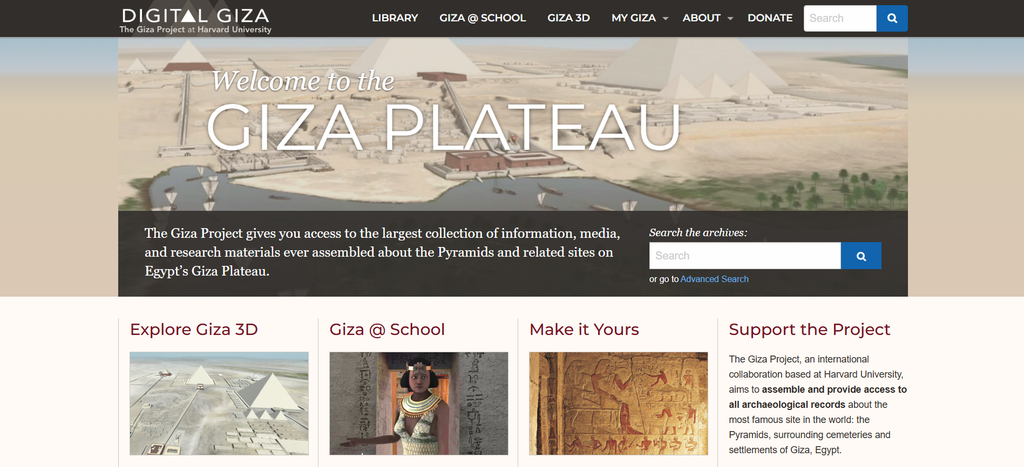
Digital Giza is pretty self-explanatory: it is a digital archive and information source surrounding the Giza Plateau in Egypt. The website is very visually appealing at first glance, greeting the user with a large banner image of a 3D render of the Giza Plateau with the message “Welcome to the GIZA PLATEAU” typed out in a white font color in front of it. Directly below the image, there is a text box explaining the purpose of the website with a search bar on the right hand side. This gives users immediate access to the site’s archives. The heading at the top of the website has its logo, which can bring users back to the homepage, as well as different web page categories that read out LIBRARY, GIZA @ SCHOOL, GIZA 3D, MY GIZA, ABOUT, and DONATE, all in a white font color and behind a dark brown backdrop. The MY GIZA and ABOUT categories are actually dropdown menus that allow users to browse through the site’s collections and learn more about the purpose of the website itself. There is also another search bar on the far right-hand side of the heading, which serves the exact same purpose as the previously mentioned search bar. Scrolling down, users are shown four main web page directories titled Explore Giza 3D, Giza @ School, Make it Yours, and Support the Project, this time in a maroon font. Each of these directories have a button that users can click to access the separate pages. At the very bottom of the page, users can find all of the same web pages from the heading, this time in the form of small hyperlinks. On the bottom left of the page is copyright information pertaining to the Giza Project at Harvard University, and on the bottom right is a logo for the National Endowment for the Humanities with a link to their official website.
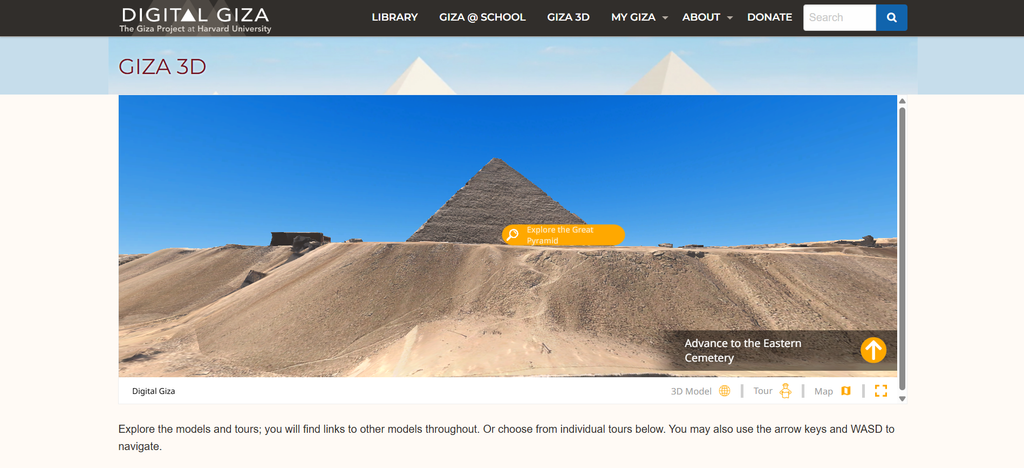
The main draw to this website easily goes to the Explore Giza 3D section, as clicking it allows users to immediately access 3D models of different and explorable areas of the Giza Plateau. The largest section of this webpage is an interactable client called Digital Giza Expeditions that users can activate by clicking a blue START TOUR button. From there, users can choose to click two new buttons: EXPLORE, which drops the user on the edge of the 3D space and starts them off with one of the pyramids, and MAP, which allows users to choose which area of the Giza Plateau they would like to explore first. There’s also a section on the bottom left side of this client that allows users to access the tour and maps sections without having to reload the page, as well as a photogrammetry/3D model toggle that users can switch from when viewing the map. Scrolling down towards the bottom of the page reveals GIZA GUIDED TOURS, a section of organized shortcuts that gives users the ability to navigate through these specific areas without relying on the client’s map. These guided tours consist of the Khafre Pyramid, Khafre Pyramid Temple, Khafre Valley Temple, Khufu Pyramid, Khufu Pyramid Temple, Khufu Valley Temple, Menkaure Pyramid, Menkaure Pyramid Temple, Menkaure Valley Temple, Great Sphinx, Sphinx Temple, Tomb of Queen Hetepheres I, Tomb of Queen Meresankh III, and a cemetery site known as G2100. Accessing the 3D model through these shortcuts will also add a link containing the archives of that specific location, which appears on the left hand side of the client window in a yellow font color. Past the GIZA GUIDED TOURS section, users can find VIRTUAL TOURS, a different version of the 3D environment client that uses photogrammetry instead of 3D models. These tours consist of the Mastaba Tombs of Queen Mersankh III, Khufukhaf, Qar, Idu, Iasen and Neferbauptah, however all but one of these tours are either set as private or not currently available to be viewed as of this analysis.
The overall aesthetic and visual theme of the website is not only tasteful, but also makes sense given its purpose. Digital Giza mostly uses these specific shades of white for the main backdrop of the page that are darker and almost bone-like in color. This gives the website an even mix of both simplicity and character, as the shades of white come across more like sand rather than an average background. The addition of other colors like maroon for certain text and brown for the page heading also aid in the website’s earthy and grounded feel. As mentioned previously, the home page greets the viewer with a large image of Giza with a welcoming message typed over it in a white font color. The image itself shows mostly sand where the text is placed, and while the combination of a white font color mixed with a tan background would normally be hard to read, this website added a drop shadow effect to the message. Although it is subtle, this helps make the message pop and separate the white font with the sandy background image.
The usability of this website is not as simple as its appearance. As also previously stated, there are two separate search bars that viewers can use on the homepage to access the site’s archives. These search bars serve the exact same purpose and can both be seen without scrolling a single inch. Having both of these search bars would be confusing for new users and only one should be featured on the homepage. The bottom of the homepage includes the exact same links and categories that can be found in the page heading, which might help fill out the space but could also be seen as visual noise that does not serve a stronger purpose. The four main categories highlighted under the welcome image, Explore Giza 3D, Giza @ School, Make it Yours, and Support the Project, are also repeat links that can be found in the heading and the bottom of the page. In total, there are thirty-three separate links that can be found on the homepage and only fifteen of those links redirect users to unique pages. The inclusion of all these links and categories might help visually fill out the homepage, but the unnecessary amount of them only contributes to bloating the website with no real substance. New users might get lost in the sense that they would expect more content from this site.
As a whole, Digital Giza is a rather inoffensive website in terms of its design and user experience. It takes on the bland topic of studying ancient Egyptian history and makes it approachable, accessible, and visually appealing. It’s by no means a perfect website for the topic at hand; the unnecessary amount of links that direct to the same webpages would be seen more as screen clutter instead of good design. With enough time and a slight restructure of the website’s contents, Digital Giza could become the number one platform for research and archival information relating to the Giza Plateau.
You can visit the following website and form your own opinion at https://giza.fas.harvard.edu/
Leave a Reply